
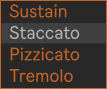
The Articulation Menu displays all articulations currently loaded into the Articulation Pad. You can select articulations manually or automate the menu in the Arrangement View or Session View MIDI clips by drawing articulation envelopes.
For manual control, it is recommended to use a MIDI controller with a Control Surface for Instant Mapping (Bank 1, Slot 1), as manual MIDI assignments are impractical when controlling multiple KSEM instances. Alternatively, you can define a Keyswitch Zone or assign an Articulation CC to the right of the Articulation Pad.